


Music Player & MP3 - MMusic
4.71.12K Reviews
App Specs
- Version
- 2.2.7
- Updated On
- License
- Free
- Downloads
- 10,000,000+
- Developer
- ICC Tech
- Categories
- Music & Audio
- Platform
- Android, iOS
Screenshots
 Analysis by AppCompare
I judge a music player less by its first screen than by what it lets me do with a personal library over time: find the right track, make it sound comfortable, and keep a collection tidy enough to use. That is the lens I bring to Music Player & MP3 - MMusic. It is a music and audio app from ICC Tech, aimed at listening to music already available on a device rather than replacing a streaming service. Its appeal is practical: familiar playback, offline access, and a few tools for shaping how a collection sounds and looks.
A useful starting point for a personal library
When I want music for a walk, a commute, or a stretch of work without relying on a connection, a local-library player makes sense. I can choose tracks I already have, rather than build the session around what a streaming catalog happens to offer. The app’s offline focus suits that routine, especially when I want to keep mobile data for maps or messages. It also means the quality of the experience depends partly on the music files I bring to it: this is most useful when I have a collection ready to browse.
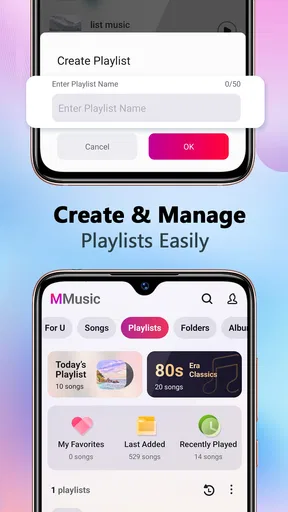
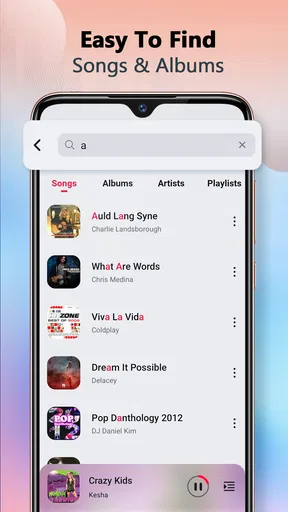
The first decision is less about discovering new artists and more about how I want to organize what I own. I might make one playlist for an exercise session, another for familiar background music, and leave albums intact for focused listening. Search helps when I remember a song but not where it sits in the library. For someone with a growing collection, that combination is more meaningful than a flashy home screen; for someone who mainly wants an endless stream of unfamiliar tracks, a streaming app is likely a better starting point.
Shaping the sound without overcomplicating it
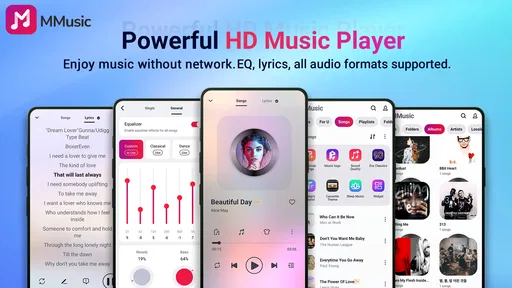
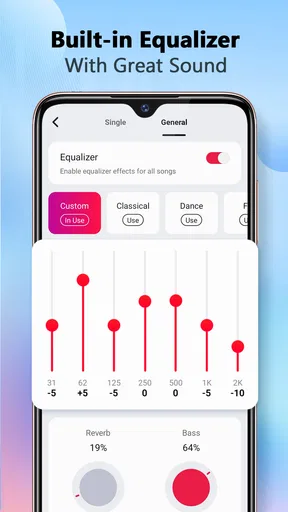
The equalizer is one of the app’s more hands-on tools. I can choose a preset when I want a quick change, or create a sound profile when a general setting does not suit my headphones or the music I am playing. I would treat those adjustments as personal listening preferences, not as a fix for every recording. A heavy bass setting may flatter one playlist and muddy another, so I find it useful to switch back to a neutral sound when comparing tracks or moving between genres.
A practical habit is to make small changes rather than pushing every control toward an extreme. If spoken details or vocals become harder to hear, that is a cue to ease off and listen again. The point is not to chase a supposedly perfect curve; it is to make a collection comfortable for the way I listen. That is a helpful distinction for anyone who expects an equalizer to improve every file automatically. It gives me control, but it also asks me to use that control with a little care.
Making everyday listening easier
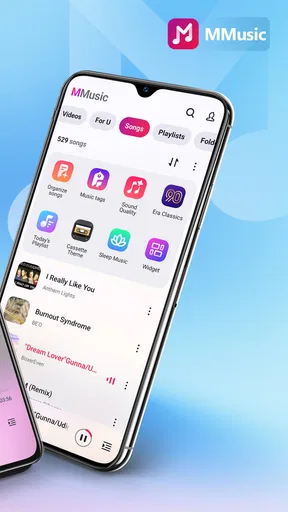
As soon as I launched Music Player & MP3 - MMusic, I was greeted with a sleek, intuitive interface. You know how some apps just feel right from the get-go? This one has that vibe. The layout is clean, and navigating through my playlists was as smooth as silk. It’s like the app knew exactly what I wanted before I even asked.
Features That Stood Out
Okay, let’s talk features. One of my favorites is the customizable equalizer. Whether you're into bass-heavy beats or smooth jazz, you can tweak the sound to your heart’s content. It’s got presets for days, and if you’re feeling adventurous, you can create your own sound profile. Pretty nifty!
Worth Reading Before You Choose

EA SPORTS FC Mobile 26 Is a Bigger Football Game, but It Takes Time

Flipboard Shows What News Apps Must Do Beyond the Feed

Switching to Android Auto Means Rethinking Your Driving Routine

Google Calendar Makes a Crowded Week Easier to Manage

Ludo King Makes the Most of the Minutes Between Plans

Baby Panda World Brings Quick Play to Modern Phones, but Its Game Library Feels Busy
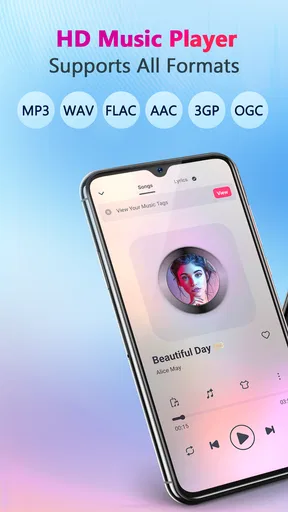
Another cool feature is the offline playback. I’m always on the go, and having my tunes accessible without chewing through my data is a game-changer. Plus, the app supports a wide range of file formats, so no more worrying about converting your tracks. Just download and play!
User Experience
Now, I’ve tried a fair share of music apps, and I have to say, MMusic knows how to keep things simple yet effective. Adding songs to playlists is a breeze, and finding tracks is as easy as pie with the built-in search function. The app even makes recommendations based on your listening habits. It’s like having a personal DJ in your pocket.
And for those moments when you’re feeling creative, the app lets you edit song tags and album art. It’s the little things that make a big difference, right?
Keeping a collection organized
Tag and artwork editing is useful beyond appearances. If a file has an unclear title or inconsistent artist details, correcting that information can make later searches and playlist building less frustrating. I would tidy a few troublesome tracks at a time rather than attempt a full-library cleanup in one sitting. Before changing information across many files, it is sensible to check a small sample and confirm the result looks right in the library. That small workflow avoids turning a quick listening setup into a long metadata project.
There is a trade-off here: tools for managing a personal library are valuable when the files need attention, but they are not the same as a dedicated desktop music organizer. I would use MMusic for practical corrections while listening, not expect it to replace a full collection-management workflow. If album art or tags are already consistent, I can simply leave them alone and focus on playback.
How it fits a normal day
Imagine getting ready in the morning and choosing a playlist for the journey ahead. At home, I can find the tracks I want and adjust the sound for the earbuds I plan to use. Once I leave, offline playback makes that listening routine less dependent on a connection. Later, if a song appears under a confusing title, I can correct its tag when I have a moment, rather than interrupt the entire morning to reorganize everything. That is a modest but realistic use case: the app supports a routine instead of demanding one.
For a more deliberate session, I would make separate playlists for different contexts instead of relying on one very long queue. A work playlist can avoid the need to search repeatedly, while a walk playlist can keep a different mix ready. Search remains handy for exceptions, but playlists reduce taps when I already know the mood or activity I am planning for. This is a simple organizational choice rather than a hidden feature, yet it makes a local player feel much more convenient day to day.
Where it sits beside other music apps
Compared with a typical streaming service, MMusic is a better fit when I want to manage and play my own files, listen offline, and make quick sound or tag adjustments. A streaming app is stronger for browsing a large hosted catalog, following new releases, or sharing listening across a cloud-based account. Those are different jobs, so I would not choose this player expecting it to behave like an all-in-one discovery service. If I mainly build my listening around recommendations and catalog access, the usual streaming option is likely more satisfying.
Compared with a very basic local player, the equalizer and the ability to edit tags and artwork give me more ways to refine a library without making the app’s purpose complicated. The balance will suit listeners who value practical control, though anyone who wants advanced library sorting or elaborate audio workflows may prefer a specialist tool. I see MMusic as a convenient everyday player, not a studio app or a substitute for professional audio editing.
Compatibility, cost, and who should try it
The app is free to install, with in-app purchases listed from $0.99 to $5.99 per item. Its current version is 2.1.0 and it supports Android 7.0 or later. It is rated Teen. The audience response is strong, with an average rating of 4.8 from around 61,000 ratings, and it has passed 10 million installs. Those figures suggest that it has reached many listeners, but they do not tell me whether it matches every person’s library habits; the useful question is whether I want a player for local music and hands-on organization.
I would recommend trying it if I already keep music files on my device and want a straightforward way to play them offline, arrange playlists, adjust playback, or fix untidy tags. I would be less likely to recommend it to someone who has no local collection and expects the app to provide a large catalog of songs. I would also look elsewhere if advanced audio production, deep library analysis, or a cloud-synced listening setup is central to the task. ICC Tech has made a focused tool, and its value is clearest when that focus matches the listener.
Small habits that make it work better
For a new setup, I would start by checking whether the tracks I care about are easy to find, then build a couple of playlists around real routines. I would test an equalizer preset with familiar music before saving a custom profile, since a known song makes changes easier to judge. If I edit tags or album art, I would make one correction and confirm the library reflects it before repeating the process. These steps are not complicated, but they help avoid unnecessary fiddling and make the app useful sooner.
One question people often have is whether offline listening means they can forget about a connection entirely. For music already available to play on the device, offline playback is the key convenience; it does not turn the app into a source for tracks that are not in the personal library. Another common concern is whether a file needs converting first. The app supports a wide range of formats, which reduces that hassle, although keeping a clean, well-tagged collection still makes browsing easier.
Final Thoughts
So, is Music Player & MP3 - MMusic worth downloading? In my opinion, absolutely. It’s got everything you need in a music player, from powerful features to a user-friendly design. Whether you’re a casual listener or a hardcore audiophile, this app has something for everyone.
If you’re ready to upgrade your music experience, I’d say give it a shot. Who knows, it might just become your new favorite app. Happy listening!
My creator-minded verdict
Although music playback is not the same as producing a song, I find the app most useful as a small library-management tool in the stretch between collecting audio and enjoying it. I can prepare playlists, adjust how familiar material sounds, and clean up basic metadata before sharing a device or settling into a listening routine. It does not replace the software I would use to record, mix, or publish music, and I would not treat its tag editing as a full release-management system. Its strength is helping me keep existing audio ready to play.
For someone deciding whether to install it, I would ask one simple question: do you want control over music files you already have, or do you want a service to supply and continually recommend music? If it is the first, MMusic offers a sensible set of tools without asking me to turn listening into a complicated project. If it is the second, a catalog-driven alternative is the more natural choice. That distinction makes my recommendation straightforward: I would keep this app in mind for offline, personal-library listening, while choosing something else for discovery-first listening or serious audio creation.
Pros
- User-friendly interface and easy navigation.
- Supports a wide range of audio formats.
- Offline playback for downloaded songs.
- Customizable equalizer settings.
- Minimal battery consumption.
Cons
- Contains ads that can disrupt playback.
- Limited features in the free version.
- Occasional crashes on older devices.
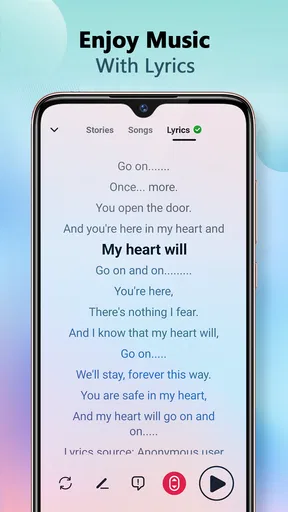
- No built-in lyrics support.
- Lacks integration with streaming services.
FAQs for Music Player & MP3 - MMusic
What features does Music Player & MP3 - MMusic offer?
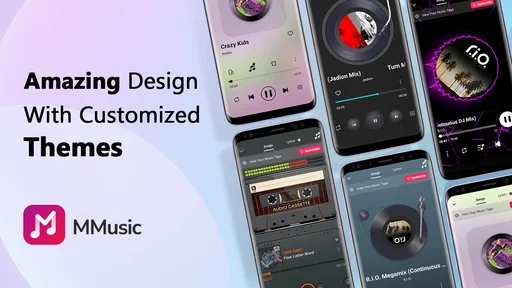
Music Player & MP3 - MMusic offers a range of features including an equalizer, support for various audio formats, playlist management, and offline listening capabilities. Users can customize their listening experience with themes and widgets, and the app also provides seamless integration with other music platforms.
Is Music Player & MP3 - MMusic free to use?
Yes, Music Player & MP3 - MMusic is free to download and use. However, it may offer in-app purchases or a premium version to unlock additional features, such as ad-free listening or advanced audio settings. Be sure to check the app's description for specific details on pricing.
Can I use Music Player & MP3 - MMusic offline?
Absolutely! One of the key features of Music Player & MP3 - MMusic is its offline playback capability. You can download your favorite tracks to your device and listen to them without an internet connection, making it ideal for travel or areas with limited connectivity.
Does Music Player & MP3 - MMusic support all audio formats?
Music Player & MP3 - MMusic supports a wide variety of audio formats, including MP3, WAV, AAC, FLAC, and more. This ensures that users can enjoy their music collection without compatibility issues. Always check the app's specifications to confirm supported formats for your specific needs.
How user-friendly is the interface of Music Player & MP3 - MMusic?
The interface of Music Player & MP3 - MMusic is designed to be intuitive and user-friendly. It features a clean layout with easy navigation, allowing users to quickly access their music library, playlists, and settings. The customization options further enhance the user experience, making it suitable for both beginners and advanced users.


